.png)
How to Buy an ETF on Interactive Brokers (2026 Guide)


Interactive Brokers is one of the cheapest and most respected places to hold long-term ETFs, but the first purchase trips a lot of people up. The interface throws a lot at you, the same ETF shows up under several tickers, and there is one account setting almost everyone forgets to switch on. This guide walks you through the whole thing on the Client Portal (the browser version), step by step, with screenshots from a real account.
We will use the SPDR S&P 500 UCITS ETF (ticker SPY5) as the example because it is the cheapest S&P 500 tracker available to European investors (0.03% ongoing charge) and one of the most liquid ETFs in Europe, with over EUR 15 billion in assets. The exact steps are identical for any other ETF, just swap the ticker. And if you are wondering whether your money is in safe hands first, we covered that separately in our breakdown of how safe Interactive Brokers is (short version: it is a Nasdaq-listed, S&P 500 company, so yes). We also recorded the whole process on video, web and mobile, and you will find it further down if you would rather watch.
One assumption before we dive in: you are investing money you will not need for several years, and you already have an emergency fund (three to six months of expenses) set aside separately. If not, sort that out first. ETFs are long-term holdings, not somewhere to park cash you might need next month.
Step 0: Turn on your trading permissions (the bit almost everyone misses)
This is the single most common reason people email us saying "Interactive Brokers will not let me buy this ETF" or "it will not let me buy a fractional share". The fix takes about thirty seconds, and it is a one-time setting.
Once you are comfortable buying, some long term investors add a measured amount of leverage. Here is how margin works at Interactive Brokers, with real worked examples.
"Permissions" sounds like you have to pass a test. You do not. You just have to tick a box. Here is where it lives. In the Client Portal, click the settings icon in the top right, then open Settings, scroll down to the Trading section, and click Trading Permissions.

Settings > Trading > Trading Permissions. This is where you tell IBKR which markets you want to trade.
On the next screen you choose which stock markets you want access to. For SPY5 in this guide you need the United Kingdom enabled, because it trades on the London Stock Exchange. If you ever want to buy ETFs listed in, say, Australia or the US, you would tick those too. There is no downside to enabling markets you might use later, so most experienced users just switch on most of them. We have a full reference on setting up ETF trading permissions on IBKR if you want the detail.
One toggle matters more than any other: under All Global, enable Global (Trade in Fractions). If this is switched off, you simply cannot buy fractional shares, full stop. That means if a single share costs more than the amount you want to invest, the order gets blocked. With it on, you can buy any dollar amount you like.

The one you do not want to miss: "Global (Trade in Fractions)". Without it, no fractional buys.
Click Continue when you are happy. Permissions usually update instantly. In the rare case they do not, give it up to one business day and they will be live.
A quick note on currency before you buy
Interactive Brokers does not convert your money for you. If your cash is in euros (or pounds) and you buy a USD ETF like SPY5 without converting first, the trade still goes through, but on a margin account you will simply be running a small US dollar margin loan, you pay interest on it, currently around 6% a year, until you convert. So convert first. There are two cheap ways to do it:
- Let IBKR auto-convert at the moment you trade. It adds roughly 0.03% to the exchange rate and charges no separate commission and no minimum. For most ordinary purchases this is the cheapest option you will find anywhere, cheaper than Revolut, Trading 212, or your bank.
- Convert the cash manually first (using the currency conversion screen inside your account). This costs about 0.002% with a USD 2 minimum, so it only wins on larger amounts.
The crossover point is around USD 6,667 per conversion. Below that, the 0.03% auto-convert beats the USD 2 manual minimum. Above it, do a manual conversion first. Either way you are paying a fraction of what a typical European broker charges in FX fees (often 0.5% to 1.5%), which over years of monthly investing adds up to real money. We go deeper into all of this in our analysis of IBKR's fees.
If you fund your account in US dollars and buy a USD ETF like SPY5, none of this applies to you, your cash is already in the right currency.
A quick word on which ETF (then we buy it)
Picking the right ETF is its own topic, and not one we will settle here. For this walkthrough we are buying SPY5, the SPDR S&P 500 UCITS ETF. A few facts so you know what it is:
- Tracks the S&P 500 (the 500 largest US companies), full physical replication
- Ongoing charge of just 0.03% per year, the lowest of any S&P 500 UCITS ETF
- Domiciled in Ireland, denominated in US dollars, distributing (it pays dividends out)
- ISIN IE00B6YX5C33, over EUR 15 billion in assets
That Irish domicile is not an accident, by the way. Irish-domiciled UCITS ETFs benefit from the US-Ireland tax treaty, which cuts the withholding tax on US dividends from 30% down to 15%. On an S&P 500 tracker held for years, that gap compounds into real money, which is why almost every European-listed S&P 500 ETF is domiciled in Ireland.
You will run into other tickers for what is essentially the same exposure, CSPX, SXR8, VUSA, VUAG. They are mostly the same fund listed on different exchanges, in different currencies, or in accumulating versus distributing versions. If you want to compare a couple of them properly, see VUAG vs VUSA, and the free tool justETF is a good place to screen and compare ETFs before you decide. Once you have made your choice, the steps below are the same. Just type your ticker instead of SPY5.
Step 1: Find your ETF in the Client Portal
Log in to the Client Portal in your browser. (IBKR gives you several ways to get into your account, all sharing the same login, more on which one to pick further down. For this walkthrough we are on the web Client Portal.)
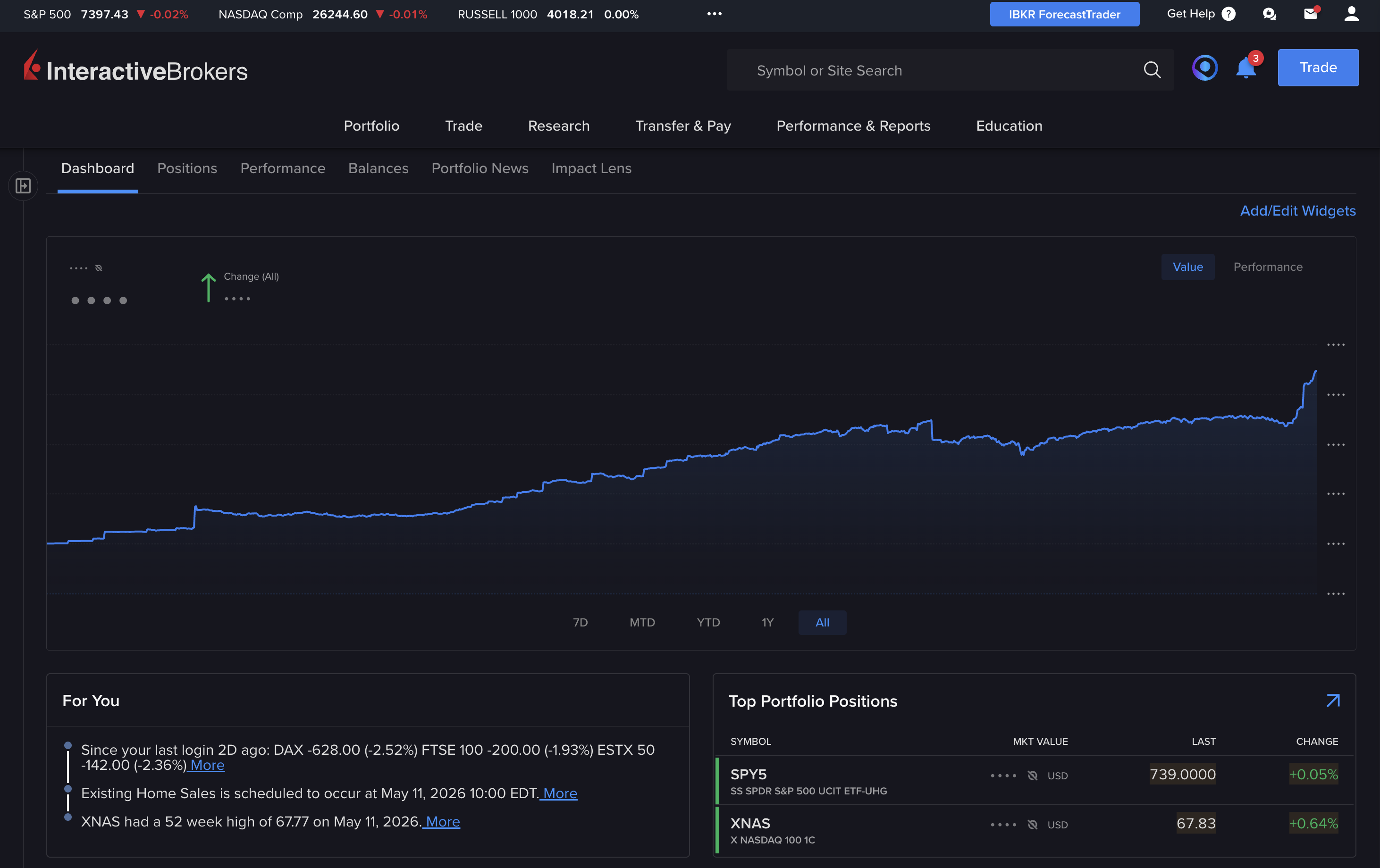
The Client Portal dashboard. The search bar at the top is how you find any ETF.
Type your ticker into the search bar at the top, in our case SPY5. You will see more than one result. That is normal: the same ETF is listed on several exchanges in several currencies.
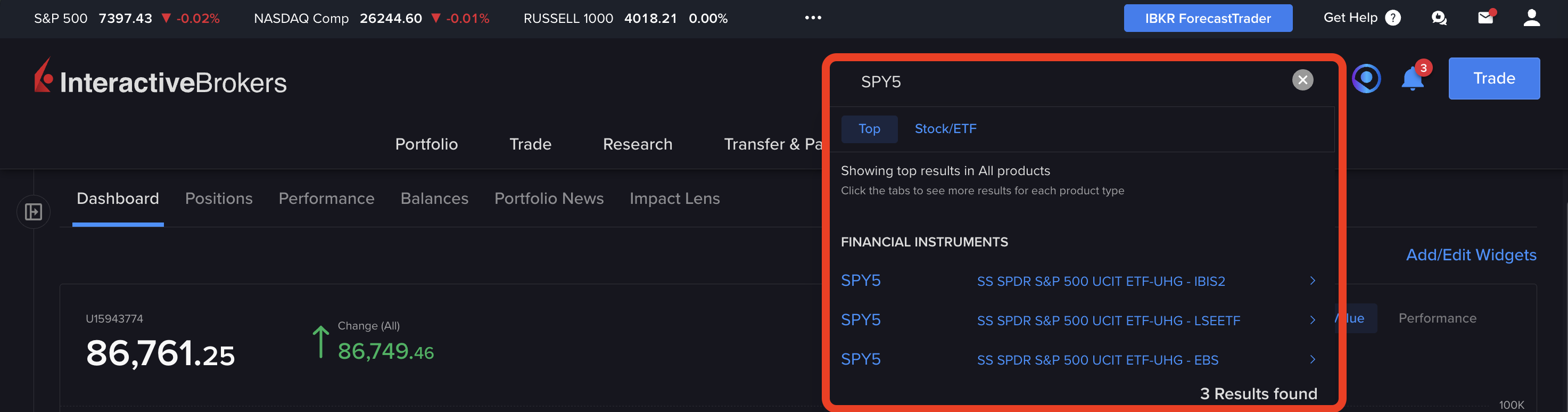
Searching SPY5 returns three listings: IBIS2 (Frankfurt), LSEETF (London), EBS (SIX Swiss). Pick the one that matches the exchange and currency you want.
Those abbreviations are exchange codes. IBIS2 is Xetra in Frankfurt, LSEETF is the London Stock Exchange ETF order book, EBS is the SIX Swiss Exchange. We are buying the London listing in US dollars, so we want SPY5 on LSEETF. If you are not sure which code is which, we keep a full list in our guide to European stock exchange codes on Interactive Brokers. One nice thing: once you own an ETF, you never need to search for it again. You can just open it from your portfolio and buy more.
Step 2: Open the order ticket
Click the listing you want, then click Buy. The order ticket opens.

The SPY5 order ticket. Note the tight bid-ask spread, your available cash, the account selector, and the Shares/USD dropdown we are about to use.
A few things to take in here. The bid and ask prices at the top show the spread, the gap between what you can buy and sell for right now. On a liquid ETF like SPY5 during London trading hours that gap is tiny, which matters more than you might think (more on that below). The ticket also shows your available cash, and an account selector, handy if you have sub-accounts (one IBKR login can hold, for example, a family member's portfolio alongside your own). Make sure Buy is selected, not Sell or Close.
Step 3: Shares, or a dollar amount? (this is the fractional part)
You can size the order two ways. Either you enter a number of shares (one SPY5 share is around USD 739 at the time of writing), or you switch the dropdown to USD and enter a dollar amount instead.
We almost always recommend the dollar-amount method. Switch the dropdown from Shares to USD, type in, say, 50, and IBKR works out that you are buying about 0.07 of a share. That is fractional trading, and yes, it works on SPY5, IBKR supports fractional buys on more than 22,000 stocks and ETFs. The minimum is USD 1 (or 0.0001 of a share). The reason to do it this way: no mental arithmetic. If you are dollar-cost-averaging, you just buy "USD 500 of SPY5" every month and never think about the share price. This is also why Step 0 mattered. If "Global (Trade in Fractions)" is off, this dropdown will not let you do it.
Step 4: Pick an order type (and leave routing on SMART)
The order type controls how your order is filled. The two you actually need to know:
- Market order: fills immediately at the best price currently available. For a liquid ETF like SPY5 during London hours (roughly 8:00 to 16:30 UK time) this is fine, and it is what most long-term buy-and-hold investors should use.
- Limit order: you set the maximum price you are willing to pay, and the order only fills at that price or better. Use it if you are buying right at the open or close, when spreads can widen, or if you simply want price control. The trade-off is that a limit order might not fill at all if the market does not reach your price.
Leave the time-in-force as Day for a market order. And leave the exchange/routing field on SMART. That is IBKR's SmartRouting, and it is genuinely useful: instead of you having to pick a venue, it continuously scans the London Stock Exchange and other venues for the best available price and re-routes your order in real time as conditions change. You do not need to second-guess it. That is the whole point of leaving it on SMART.
Step 5: Preview, then submit
Before you commit, click Preview Order. Do not skip this. The preview shows you the estimated commission, any currency-conversion impact, the total cost, and exactly what you are buying. It is a thirty-second sanity check that has saved a lot of people from a fat-finger error.
On SPY5 (US dollars, London listing, IBKR Pro Tiered pricing), the commission is 0.05% of the trade value, with a minimum of USD 1.70 and a maximum of USD 39. So a USD 500 purchase costs USD 1.70 in commission. A USD 5,000 purchase costs USD 2.50. Worth knowing: as a European customer you are always on IBKR Pro pricing, IBKR Lite is a US-only plan, so there is no plan decision to make here. If you want the full picture, see IBKR Lite vs IBKR Pro and Fixed vs Tiered pricing.
Happy with the preview? Confirm, then Submit Buy Order. It may take a moment to fill. You can watch it under Trade > Orders and Trades > Trades, where you will see the price you got and the commission you paid once the order is done. Then the ETF lands in your portfolio and your cash balance drops by the amount you spent. That is it. You own the ETF.

A filled ETF buy in the Trades tab. The commission line reads "Fees: 1.7", USD 1.70. This example is a Nasdaq 100 ETF bought on the London market; the commission is the same for SPY5.
What it actually costs (and why "zero commission" can be a trap)
Here is the thing most "free" brokers do not want you to think about: the real cost of a trade is not just the commission, it is commission plus the spread, the gap between the buy and sell price. Some zero-commission brokers make their money by quoting you a slightly worse price than the real market price. You do not see a commission line, so it feels cheaper, but on a long-term hold you can easily end up paying more through the spread than you ever saved on commission.
Interactive Brokers does charge a small commission (the USD 1.70 minimum on SPY5), but it pairs that with very tight spreads, and on the currency side, that 0.03% auto-conversion (or 0.002% manual) instead of the 0.5% to 1.5% you would pay almost anywhere else. Add it up and the all-in cost of buying and holding an ETF on IBKR is one of the lowest available. That is the case for using it, especially if you are investing the same amount every month for years.
Which platform should you actually use?
IBKR gives you several front ends, all on the same login (so your holdings sync across every one) and all free. Here is how we would choose:
- Global Trader app (mobile): our default recommendation. A genuinely sleek, simplified interface, the closest IBKR gets to a fintech broker like Trade Republic. If you mostly want to buy ETFs and check your portfolio, this is the easiest way in.
- IBKR Mobile app: a good alternative if you want a bit more detail and more features than Global Trader gives you, still on your phone.
- Client Portal (web, the one used in this guide): the go-to if you prefer using a computer.
The buying flow is the same wherever you are: search the ticker or tap the holding you already own, hit Buy, flip the amount from Shares to USD, choose your order type, hit Preview, then Submit. Because the login is shared and everything is free, just try whichever one feels right for you.
Next steps
Once you have made your first buy, the obvious move is to make it automatic. IBKR lets you set up recurring investments so your SPY5 (or whatever you chose) buys itself on a schedule, see how to automate your investments on Interactive Brokers. And if you have not opened an account yet, it is free, there is no minimum deposit, and new users can pick up up to USD 1,000 in free IBKR stock through the referral programme.
Watch the full walkthrough
We recorded the whole process end to end, on both the web Client Portal and the Global Trader mobile app, with real money. In the video the example ETF is a Nasdaq 100 tracker rather than SPY5, but the steps are exactly the same for any ETF.
Frequently asked questions
SPY5, CSPX, SXR8, VUSA, which S&P 500 ETF should I buy on IBKR?
They are all S&P 500 trackers, mostly the same underlying fund listed on different exchanges, in different currencies, or in accumulating versus distributing share classes. SPY5 (SPDR) has the lowest ongoing charge at 0.03% and is distributing; CSPX and SXR8 are both the iShares S&P 500 listed on different exchanges (0.07%) and accumulating. Pick the one in the currency you want to trade in, and decide whether you want dividends paid out (distributing) or rolled up (accumulating). See our VUAG vs VUSA comparison for a worked example of the accumulating versus distributing choice.
Why does my IBKR account show a US dollar margin loan after I bought an ETF?
Because you bought a USD-denominated ETF (like SPY5) while your cash was in another currency, and you did not convert it first. IBKR did not block the trade; on a margin account it simply borrowed the dollars for you and is now charging margin interest on that balance (a cash account cannot borrow, so this only happens on margin accounts). To fix it, convert enough of your cash to USD to cover the position (or let IBKR auto-convert next time you trade). To avoid it in future, always convert first, or check the order preview for any FX or margin impact before submitting.
What is the cheapest way to convert EUR to USD on Interactive Brokers?
For amounts below roughly USD 6,667 per conversion, let IBKR auto-convert at the time of the trade, it adds about 0.03% to the rate, no commission, no minimum. For larger amounts, do a manual conversion first on the currency conversion screen, which costs about 0.002% with a USD 2 minimum. Both are far cheaper than the 0.5% to 1.5% FX markup most European brokers charge.
Can I buy fractional shares of SPY5 on Interactive Brokers?
Yes. IBKR supports fractional trading on SPY5 and over 22,000 other stocks and ETFs, with a minimum order of USD 1 (or 0.0001 of a share). The one catch: you must have "Global (Trade in Fractions)" enabled in your trading permissions first. If you cannot enter a dollar amount on the order ticket, that setting is off, go to Settings > Trading > Trading Permissions and switch it on.
Should I use a market order or a limit order for my first ETF purchase?
For a liquid ETF like SPY5 bought during London Stock Exchange hours, a market order is fine and is what most long-term investors use, it fills immediately at the best available price. Use a limit order if you are trading near the open or close (when spreads can widen), or if you want explicit control over the price you pay. The trade-off with a limit order is that it might not fill at all if the market does not reach your price.
Should I use the Client Portal or Trader Workstation as a beginner?
The Client Portal (the browser version) for desktop, and the Global Trader app on mobile. Trader Workstation is powerful but built for active traders and feels overwhelming when you are starting out. All of IBKR's platforms share the same login and your holdings sync across them, so you can try the others later at no cost.
Do I need to pick an exchange, or should I leave it on SMART?
Leave it on SMART. IBKR's SmartRouting continuously scans the relevant exchanges and other venues for the best available price and re-routes your order in real time. Manually directing an order to a specific exchange is something experienced traders occasionally do for specific reasons; for buying an ETF, SMART is the right choice and gives you the best execution.
Trading involves significant risk and may not be suitable for all investors. The value of investments can go down as well as up, and you may lose some or all of your initial investment. Past performance is not indicative of future results.
.png)

