.png)
How to Connect Interactive Brokers, eToro and Trading 212 to AI



I hold my investments at three brokers, which leaves me with three apps, three sets of figures, and no single place to see the whole position. Working out my real exposure to one company, my sector weight across everything I own, or how much cash was sitting idle used to start with three exports and a spreadsheet.
Connecting the accounts to the assistant I already had open took the spreadsheet out of it. I ask in ordinary language, the assistant reads the account data I have authorised, and one answer covers all three accounts.
A single account gains the same thing. Ask an unconnected assistant about your allocation and it can describe how allocation works in general terms, with nothing to say about the units you hold, the cash you are carrying, or the rules you invest by. Once it can read the account, questions about overlap, concentration, and allocation get answered against your own holdings.
The three brokers get there by different means: an official AI connector at Interactive Brokers, the Public API at eToro, and either the Beta API or an experimental Agent Skill at Trading 212. Each route brings its own availability limits and requirements, and I flag them section by section. You do not need all three brokers, a specific paid plan, or a technical background. One account and one assistant are enough to start.
Two things hold across every route. Every figure the assistant returns is a claim to verify against your broker statements, and read-only access limits what a credential can do without making anything private. Both get proper treatment below.
Tested on my own three-broker portfolio
I use three brokerage accounts. Interactive Brokers holds my ETF investments, eToro runs my public portfolio, and Trading 212 is where I test strategy ideas. Each broker shows me one part of the picture. Connecting all three to the AI I already use gives me a single conversational layer across the whole portfolio.
I have run the workflow with ChatGPT and Codex and with Claude and Claude Code. In my experience, the quality of the account data and my written investing rules matters more than the choice between the two assistants. I also keep using portfolio trackers like Delta and Snowball for quick totals. The AI layer adds the follow-up questions and the custom analysis on top.
The three connection routes in plain English
The route a broker takes decides how much setup you face and what you have to protect once it is running.
Interactive Brokers now supports two connection routes. The first is a certified connector for supported AI applications, set up from IBKR's own list. The second is a direct custom MCP connection, which works with any AI application that supports MCP. MCP, short for Model Context Protocol, is a standard that lets an AI assistant plug into outside data. Either way, you authorise the link through IBKR's secure login, and your credentials are not shared with the AI application. For most readers this remains the simplest of the three to connect.
eToro runs on credentials. You create an API key in your account settings, and your AI tool calls eToro's Public API with it. An API is the interface a broker exposes so other software can read account data with the permissions you grant, and the key identifies the request as yours. eToro also publishes an official MCP server, and its job is narrower than the name suggests: it lets an AI coding environment look up eToro's API routes and schemas so the code it writes is correct. It does not connect your portfolio by itself.
Trading 212 sits between the two. Its API still carries a Beta label. You create a key with the permissions you choose, and the company also publishes an experimental Agent Skill that packages the setup for Claude Code and OpenAI Codex CLI.

What a connected setup can answer
These are the questions I put to my combined accounts, and they carry over to any portfolio, whether it sits with one broker or several.
- Where do my ETFs and individual holdings overlap?
- What is my combined sector and currency exposure?
- Which positions drive concentration?
- How much cash is sitting idle across accounts?
- How have individual positions performed across accounts?
- Does the full allocation still match my written rules?
Each answer is only as good as the data the connection can see, and none of them replaces a broker statement. I come back to verification at the end.
Watch the full setup
My video, How to Connect Your Broker to AI (Full Guide), runs the workflow end to end on real accounts, covering each broker connection and the kind of cross-account analysis described here. If you would rather watch a route before following written steps, start there and treat the sections below as the reference.
The video comes with one timing note. I filmed it in June 2026, and Interactive Brokers has since introduced a simpler official AI connector, so the IBKR steps in this article supersede the older method shown in that part of the video. The eToro and Trading 212 demonstrations still explain the API key approach used below.
Read-only does not mean private
Read-only is a permission inside the broker. Scoped correctly, it stops the connected workflow from placing, changing, or cancelling orders with that credential. I treat it as the default for any portfolio analysis setup, and every broker section below assumes it.
Privacy is a separate question. Each request you send can carry portfolio data to the AI provider, and sometimes to other tools in the chain. Read-only does not keep data on your machine, and it does not make the setup risk free. A leaked read-only credential still exposes account information, which is reason enough to guard it.
What happens to that data afterwards depends on your provider, plan, settings, and connection route. On individual ChatGPT and Codex accounts, content may be used to improve models unless you opt out through the applicable data controls, and OpenAI provides separate environment controls for Codex; the details are in OpenAI's data usage documentation. Anthropic advises users to think carefully before entering sensitive financial information and to review privacy and model-improvement settings, covered in Anthropic's guidance on sensitive data.
On the broker side, a short set of controls keeps the credential contained.
- Grant the minimum permission the task needs, which for analysis means read-only.
- Test in a demo environment first where the broker offers one.
- Restrict keys to trusted IP addresses where practical, and set an expiration where it is supported.
- Keep credentials in environment variables or an approved secret store, which are places on your own system built to hold values you should not type anywhere else. Never paste keys, secrets, passwords, or broker statements into an ordinary chat message or a plain text document.
- Revoke keys you no longer use, and rotate any key you suspect has been exposed.
- Treat broker statements as the source of truth and check figures there before acting on anything.
Connect Interactive Brokers
Interactive Brokers supports two connection routes. The first is a certified connector for a supported AI application, which IBKR lists on its own side. The second is a direct custom MCP connection, which works with any AI application that supports MCP. The AI Integration is available through Client Portal, IBKR Desktop, IBKR GlobalTrader, IBKR Mobile and Trader Workstation, so you are not tied to a single platform. IBKR currently states that the AI Integration is not available in India or Japan. For background on the broker itself, read our Interactive Brokers review.
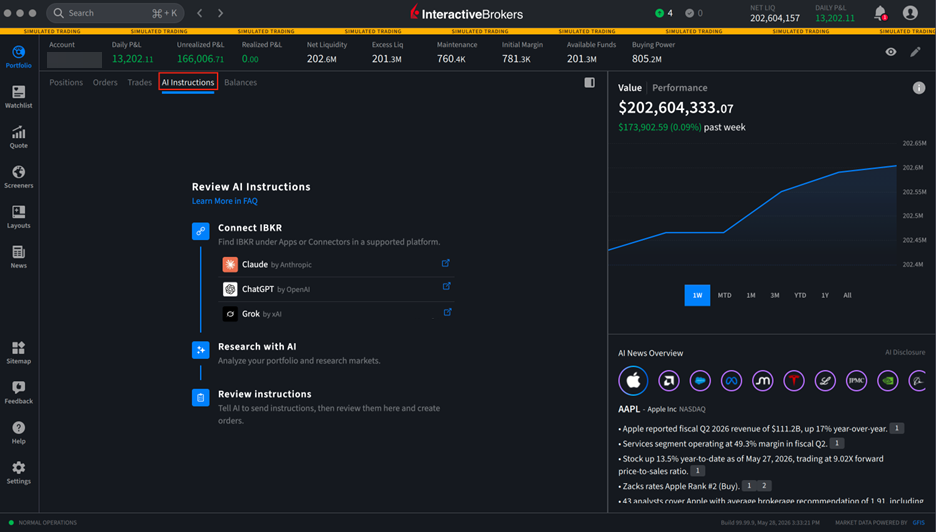
Certified connectors only cover the AI applications IBKR has listed. The custom route removes that limit, because any AI application that supports MCP can connect. IBKR's own examples include Claude Code, ChatGPT Codex and Cursor. You set it up in whatever your application calls Add MCP Server or Custom Connector, then point it at a single IBKR address. The setup card below lays out the fields you need and where the address goes.
- 1 Open the connector settings Look for Add MCP Server or Custom Connector in your AI application.
-
2
Enter the IBKR endpoint
https://api.ibkr.com/v1/api/mcp-public - 3 Sign in with IBKR Complete authentication on the broker's secure login screen.
- 4 Test the connection Start with a portfolio question and verify the result against your account.
Authentication runs through IBKR's secure login rather than the AI application, so your credentials stay with the broker and you control the access. Each connection authorises one IBKR account. IBKR also asks you to verify what the AI produces. If the assistant helps you build a trade instruction, you review it and then convert or submit it yourself inside an IBKR platform. The AI does not place the order for you.
Use an IBKR certified connector
- Log in to Interactive Brokers and open the AI Integration section. You can reach it from Client Portal, IBKR Desktop, IBKR GlobalTrader, IBKR Mobile or Trader Workstation.
- Find the certified connector for the AI application you use and start the setup from IBKR's side.
- Complete IBKR's secure login to authorise the connection. It covers a single IBKR account.
- Open your AI application and ask a read-only question, such as a summary of your holdings, to confirm the link works.
Use a custom MCP connection
- Open the settings in an AI application that supports MCP and look for Add MCP Server or Custom Connector.
- Enter the IBKR endpoint
https://api.ibkr.com/v1/api/mcp-publicand save it. - Sign in when IBKR's secure login appears. Your credentials go to IBKR rather than to the AI application, and the connection covers one account.
- Test with a read-only question first. Anything that becomes a trade instruction still needs your review and your submission inside an IBKR platform.
Connect eToro
eToro's route needs a verified account and API credentials, and the authentication documentation sets out the details. The official MCP server helps an AI coding tool understand the API, and it does not connect your account on its own. For background on the platform, see our eToro review.
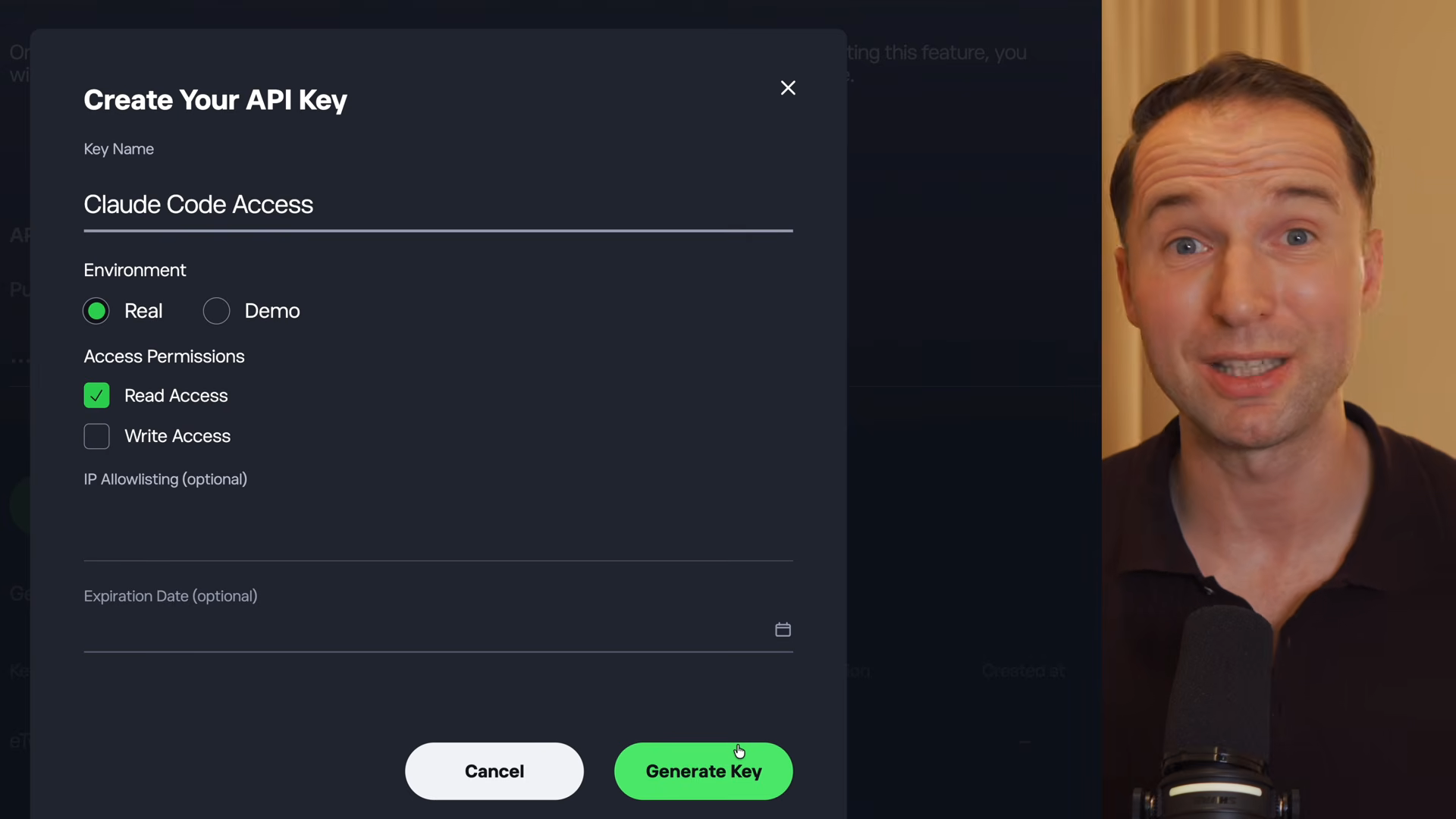
- Verify your eToro account if you have not already. API access requires it.
- Open Settings, then Trading, then API Key Management.
- Choose Demo or Real. Demo lets you prove the workflow before real account data is involved.
- Select Read permission. Read and Write are granted separately, and a portfolio analysis setup has no reason to carry Write.
- Add the optional IP allowlist and set a key expiration where that fits how you work.
- Store the API key and the user key in environment variables or an approved secret store. eToro authenticates with both, and neither belongs in a chat message or a plain text file.
- Let your AI coding tool build the connection. With the MCP server documenting eToro's routes and schemas, Claude Code or Codex can write and run the API calls from a plain-language request.
Connect Trading 212
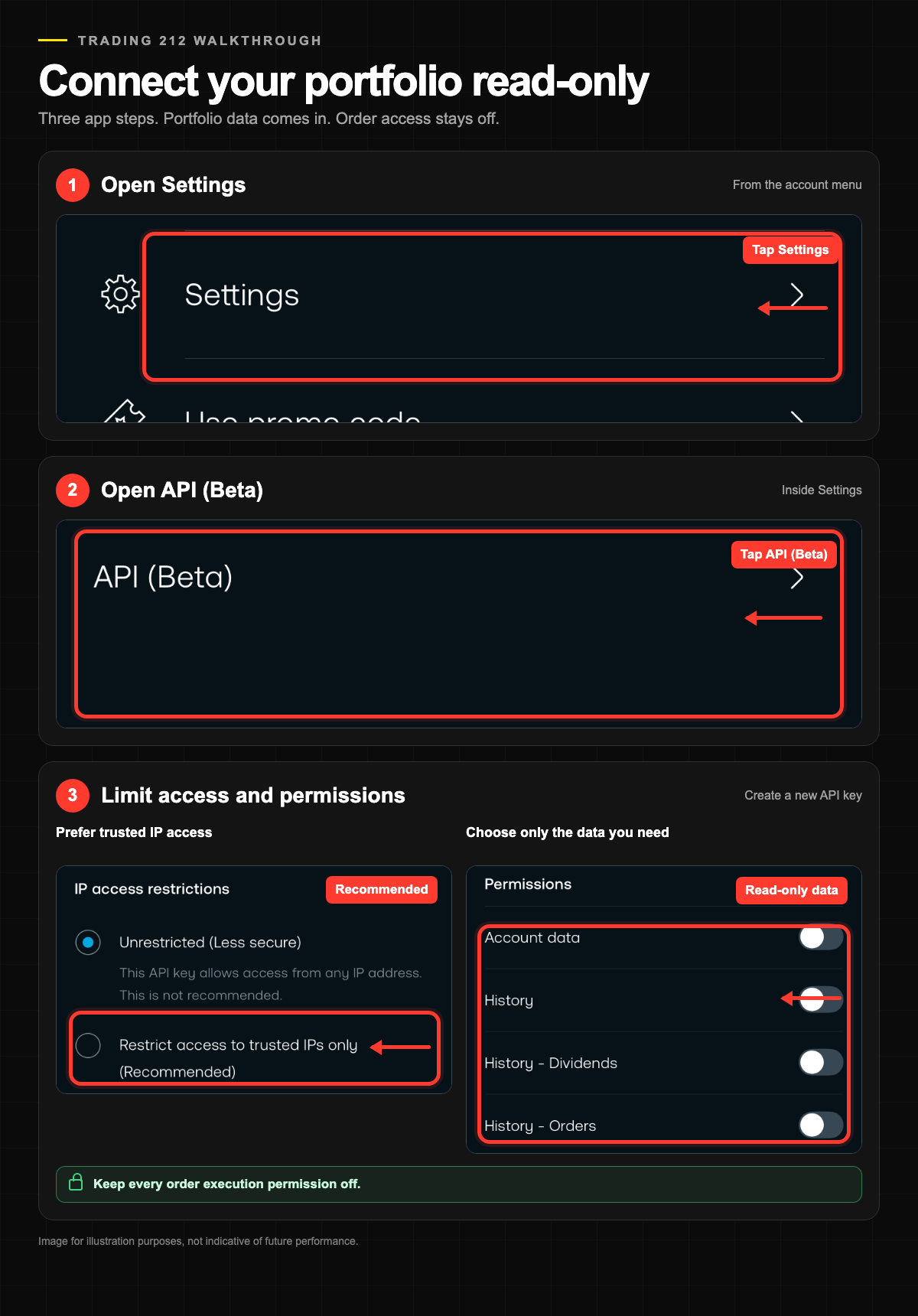
Trading 212's API still carries a Beta label and works with Invest and Stocks ISA accounts, with SIPP accounts excluded. There are two ways in: create a key and let your AI tool write the calls, or use the experimental Agent Skill that Trading 212 publishes for Claude Code and OpenAI Codex CLI. Our Trading 212 review covers the platform itself.
- Check your account type. The API works with Invest and Stocks ISA accounts and does not support SIPP accounts.
- Open Settings, then API (Beta), and create a key. The official Trading 212 API key guide documents the process.
- Choose permissions and select read-only access for analysis.
- Add the optional IP restriction if that suits your setup.
- Save the API key and secret immediately. The secret is displayed once, so both belong in environment variables or an approved secret store at that moment.
- Connect through your AI tool, either by letting Claude Code or Codex write the API calls or through the Agent Skill. The skill's own documentation warns that credentials with trading permissions could allow unintended orders, one more reason to keep the key read-only and to test in a demo environment where one is available.
Which AI tool should you use?
I have run the workflow with both, and the quality of the account data and the investing rules you write down matter more than which assistant reads them.
The route matters more than the brand of assistant. For Interactive Brokers, the choice is between a certified connector for a supported AI application and a direct custom MCP connection, which works with any AI application that supports MCP. IBKR's examples include Claude Code, ChatGPT Codex and Cursor. Trading 212 takes a comparable approach with its experimental Agent Skill, which targets Claude Code and OpenAI Codex CLI. Pick the assistant you already use, then check which route it supports. Feature availability varies by plan and by region, and IBKR currently lists India and Japan as excluded, so confirm the details before you set anything up.
Limitations and independent verification
AI answers can be wrong, and connected data can be delayed or incomplete. Nothing in this setup is guaranteed to be live or accurate, so treat every figure as a claim to check. Broker statements remain the source of truth, and checking against them before acting is part of the workflow.
The setup produces analysis and stops there. Orders, allocation changes, and every other decision stay with you, and nothing here is a recommendation to buy, sell, or hold anything.
Availability moves as well. Beta labels change, IBKR currently excludes India and Japan, Trading 212 excludes SIPP accounts, and eToro requires a verified account. Check the official pages linked in each section before relying on any detail here.
FAQ
Do I need a paid ChatGPT or Claude plan?
It depends on the connection route and the AI product. Requirements differ between chat assistants, coding tools, and broker connectors, and they change over time. Check the current requirements of the specific tools you plan to use before starting.
Is it safe to connect a broker to AI?
No setup that sends portfolio data to an outside service is risk free. Read-only permissions limit what the credential can do inside the broker, and the controls above reduce the exposure. Your data still leaves the account as part of each request, and its handling depends on the provider, plan, and settings you use.
What does read-only access actually protect?
When correctly scoped, it prevents the connected workflow from placing, changing, or cancelling orders through that credential. It does not make the data private, and a leaked read-only key still reveals account information. Protect it, rotate it if it is ever exposed, and revoke it once you no longer need it.
Do I need to know how to code?
No. Neither IBKR route requires coding: the certified connector is set up from IBKR's side, and the custom MCP route is one address plus a login. The eToro and Trading 212 routes involve API calls, though Claude Code or Codex can write those from plain-language instructions, and Trading 212 offers an experimental Agent Skill.
Can the AI place trades?
Not by itself. eToro and Trading 212 credentials scoped correctly to read-only access cannot place trades at all. With Interactive Brokers, the assistant can help you form a trade instruction, but you review it and then convert or submit it yourself inside an IBKR platform. Verify anything the AI produces.
Which account types and regions are supported?
IBKR's AI Integration authorises one account and is currently unavailable in India and Japan. The Trading 212 API covers Invest and Stocks ISA accounts but not SIPP. eToro requires a verified account, and availability varies by region. Check your own account type and region before you set anything up.
Can I connect Interactive Brokers to Claude Code, ChatGPT Codex, or Cursor?
Yes. IBKR says any AI application that supports MCP can connect through the custom route, and it names Claude Code, ChatGPT Codex and Cursor as examples. You add the IBKR address under Add MCP Server or Custom Connector, then authenticate with IBKR. Availability still depends on your account and region.
Can I connect brokers other than IBKR, eToro, and Trading 212?
In principle, any broker that documents access to your own account data can work, though the routes differ as much as the three above. Check that the method fits your AI tool, your account type, and your region before planning around it. If you are still choosing a broker, BrokerMatch can narrow the options to how you invest.
Kai is an investor who helps people choose the right broker and invest with confidence. He founded MatchMyBroker, a broker-comparison site for a global audience, and EU Investing Hub, his European-focused investing site. He also runs the Smart Money with Kai YouTube channel, where he breaks down investing, brokers and personal finance.
eToro is a multi-asset investment platform. The value of your investments may go up or down. Your capital is at risk.
This content contains affiliate links. We may earn a commission if you sign up through them, at no extra cost to you.
When investing, your capital is at risk and you may get back less than invested. Past performance doesn't guarantee future results.