getquin Review 2026: Portfolio Tracking, AI and Imports


getquin is most useful when one broker dashboard no longer shows the whole picture. It can combine investments, cash, liabilities and manually valued assets across several accounts, then add the analysis that individual broker apps often stop short of providing.
We tested the current platform with a real multi-broker portfolio on the highest plan. Our verdict is straightforward: start with the free plan and judge the import before paying for anything. Premium earns its fee when the connected data is accurate enough to diagnose performance, concentration and dividends across accounts. Wealth is aimed at investors who will also use retirement projections and goal planning.
The main limitation sits at the start of that chain. A missing transaction, transfer or purchase price can distort every return chart and AI answer that follows. getquin is an analysis and planning tool, not a broker, tax service or investment adviser.
Import your portfolio free and check the connection quality
getquin review: the short verdict
getquin is one of the best all-round portfolio trackers for investors with several accounts. Its advantage over a broker app is the ability to look across accounts: which positions drive the result, where funds and individual shares overlap, how much income the portfolio produces and whether the wider plan still fits a long-term goal.
The free plan is the right starting point because account connectivity decides whether the rest of the product is useful. Premium is the strongest value for investors who want better performance, allocation and dividend analysis. Wealth makes sense when retirement planning will become part of a regular review routine.
Investors with one simple account, no need for cross-account analytics or a broker connection that repeatedly loses history should consider another tracker or stay with the tools inside their broker.
Start with the broker connection
getquin advertises more than 2,000 bank and broker API connections, backed by manual and file imports when a direct connection is unavailable or unsuitable. The list covers large international brokers, regional institutions, banks and crypto platforms. Connection depth still varies by country, institution and data provider, so a supported logo does not guarantee a complete transaction history.
In September 2026, getquin launched a new Interactive Brokers connection developed with Interactive Brokers. It is available in the app and on the web from version 2.250.0. getquin says the new connection is designed to make IBKR imports easier and faster. That claim does not remove the need to compare the imported positions and transactions with the broker record.
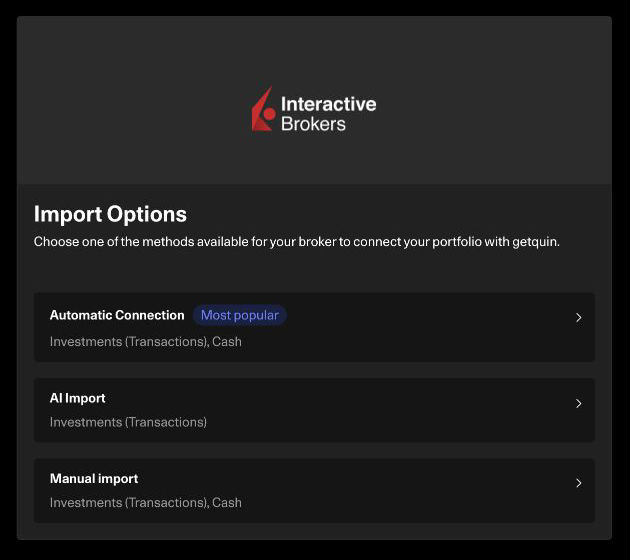
Open Banking can support daily updates when credentials are saved, although bank connections may require reauthentication after 90 days. Some broker connections bring in full transaction history. Others need a file upload or a manual correction before the portfolio is usable.
The web app also added AI document imports in June 2026. It can extract securities and positions from PDF, CSV and Excel files, which gives investors with an unsupported statement a faster starting point. getquin says the importer does not cover cash movements or crypto, and users must verify the records. Treat it as an import assistant, not an automatic reconciliation system.
Reconcile the import before trusting the analysis
A connected account can look convincing while carrying a wrong opening balance, cost basis or transfer history. Check the position count, share quantities, purchase prices, cash balance, fees and corporate actions against the source account. Transfers deserve particular attention because a missing transfer leg can look like an investment gain or loss.
From version 2.256.0, imported cash accounts can be excluded from total-asset aggregation without deleting their data. This is useful when a connected bank balance would otherwise be counted twice or when you want an investment-only total. A July 2026 change also separated cash from investment portfolios, so an existing balance may appear in a different part of the account structure.
Once the records match, the dashboard becomes the bridge from separate broker accounts to one portfolio view. It covers value, performance, holdings and top-level allocation, while account tabs keep the underlying portfolios accessible.
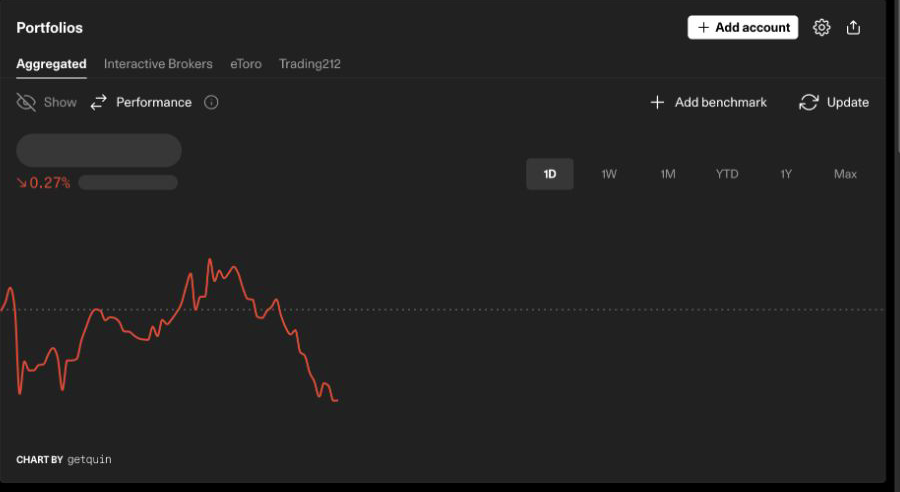
getquin can also include real estate, collectibles, art, commodities and insurance alongside stocks, ETFs, funds and crypto. Market-linked assets update automatically, while alternative assets often require manual values. The company reports more than 500,000 users and over €20 billion of assets tracked.
Performance diagnosis across accounts
Broker dashboards are usually strongest at explaining the account held with that broker. getquin becomes more valuable when you need to see whether several accounts create the same regional, sector or position risk.
DeepDive breaks exposure down by asset type, region, sector and industry. It can expose an overlap that is hard to spot when an ETF sits in one account and the same underlying companies appear as direct holdings elsewhere.
The platform supports several return views, including internal rate of return and true time-weighted return. That distinction helps when deposits and withdrawals are large enough to make a basic change in account value misleading. You can also compare performance with a benchmark over different periods.
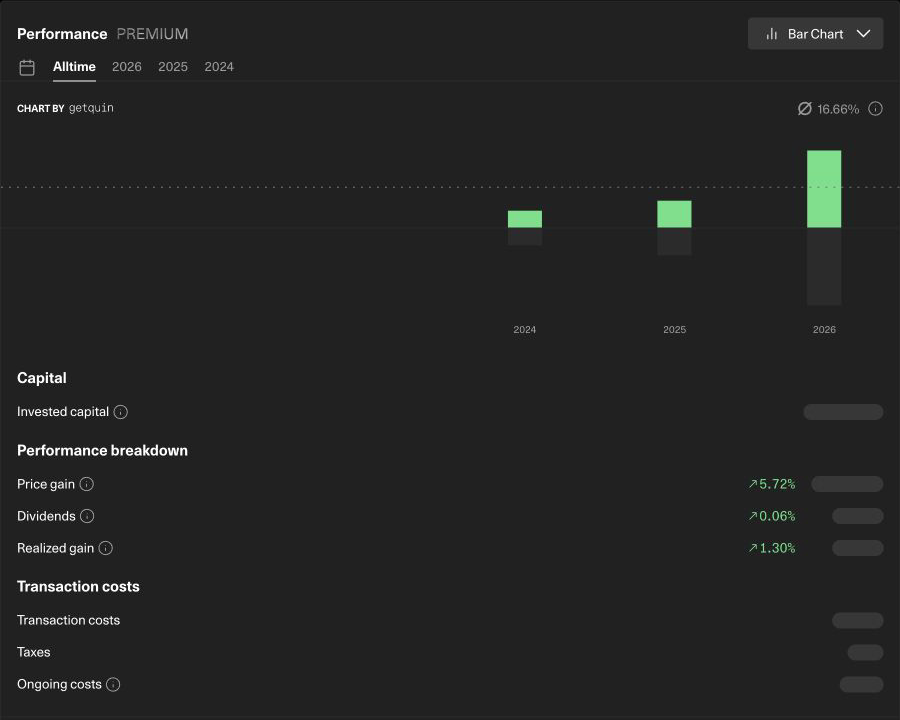
The Performance view separates price gains, dividends, realised gains and recorded costs. The wider analytics also surface taxes and dividend income. These tools are useful for diagnosis, but they do not replace an accounting ledger or a country-specific tax report. Check transfers, corporate actions and cost bases before relying on the return calculation.
When Premium earns its fee
getquin's website listed the following annual prices when we checked on July 17, 2026:
- Free: €0 per year. Best for testing account connections and basic portfolio aggregation.
- Premium: €89.99 per year. Best for investors who want deeper analytics, benchmarks and dividend tools.
- Wealth: €149.99 per year. Best for investors who will use retirement planning and goals.
Country taxes and fees can be added, and Apple or Google storefront prices may differ from the website. Check the final checkout price in your market.
Premium is the sweet spot in our view. It earns the annual fee when you regularly use DeepDive, benchmark comparisons or the performance breakdown to answer questions that your separate broker accounts cannot settle. If you only want a combined balance and holdings list, the free plan may be enough.
The paid dividend tools add historical income, trailing yield, yield on cost, payout growth, annual forecasts, a payment calendar and notifications. The consolidated calendar saves time for dividend investors with holdings spread across brokers. Forecasts remain estimates because companies can change payouts, currencies move and an incorrect share count flows through to the result.
getquin AI: a second opinion on the imported data
The AI agent can discuss the connected portfolio rather than answer only generic investing questions. We asked how well diversified the portfolio was and what the main risks were. It identified an equity-only allocation, a heavy technology tilt, North American concentration and several large positions, then explained which portfolio data supported the answer.
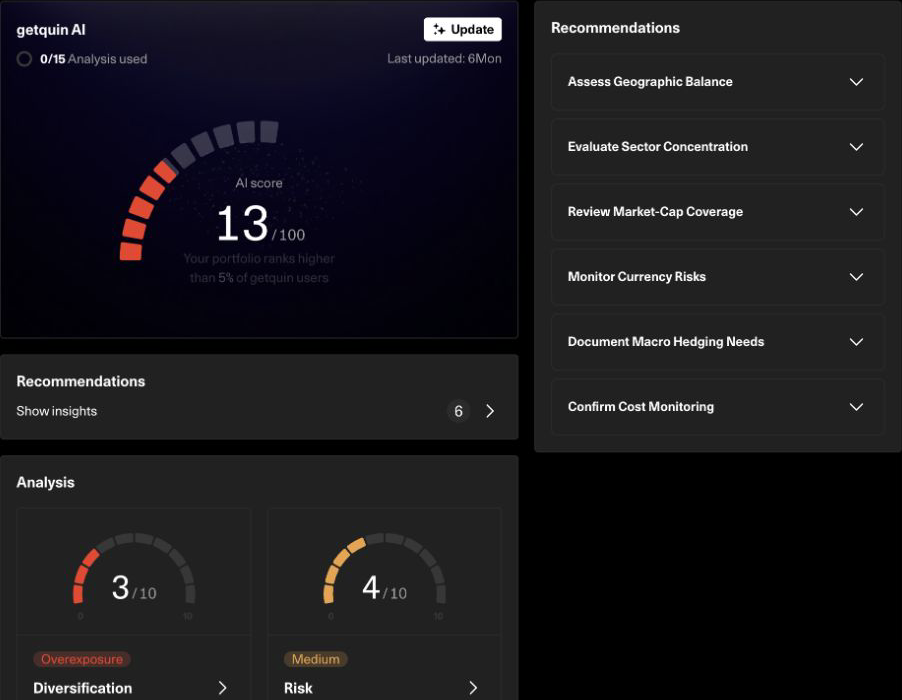
The agent can also explain recent returns, identify risk drivers, review dividends and costs, and find potential tax-loss-harvesting candidates. It is most useful when an answer points back to a specific exposure that you can verify in the portfolio analysis.
Do not treat the answer as advice. getquin's own notice says the AI can produce inaccurate, incomplete or outdated content and should not be the sole basis for a financial decision. We would use it as an analyst that generates questions, then verify every important number in the source data.
Wealth planning and Portfolio Reviews
Wealth adds a financial-planning workspace rather than another portfolio analytics screen. It models retirement age, expected pensions, desired spending, inflation, taxes, cash, investment returns and monthly contributions. Goals, real estate and future cash-flow events can be added to the projection.
The benefit is scenario testing. You can change a contribution rate, retirement age or expected return and see the effect on the plan. The projection is not a promise and does not automatically model every tax or pension rule. It provides a structured way to test whether the assumptions fit together.
getquin's 1 September 2026 product update announced Portfolio Reviews for Premium customers in Germany. The announcement does not state whether a separate fee or session limit applies. Do not assume the service is included with Wealth or available outside Germany. Portfolio Reviews are also distinct from getquin Advisory, which has separate German terms and pricing.
What changed at getquin in 2026
- May 2026 funding: getquin announced a €12 million round led by State Street Investment Management and Portage to accelerate its AI wealth-management strategy.
- June 2026 AI document import: the web app added PDF, CSV and Excel statement imports for securities and positions.
- July 2026 cash-account change: getquin began separating cash from investment portfolios. Cash is now handled as its own account type, which can change where an existing balance appears in the net-worth view.
- September 2026 Interactive Brokers connection: getquin launched a new IBKR connection developed with Interactive Brokers for the app and web from version 2.250.0.
- September 2026 Portfolio Reviews: the service was announced for Premium customers in Germany. getquin did not state whether a separate fee or session limit applies.
- September 2026 cash controls: version 2.256.0 lets users exclude imported cash accounts from total-asset aggregation without deleting the underlying data.
The sequence shows a product expanding from portfolio tracking into analysis and financial planning. It can also create short-term confusion when account types or balances move within the interface, which is another reason to reconcile the imported total before judging performance.
Security, privacy and data accuracy
QUIN Technologies GmbH in Berlin is the controller named in getquin's privacy information. Account connections are designed to be read-only, allowing getquin to retrieve data without placing trades or moving money. The company also documents encryption and GDPR controls.
The AI document importer is web-only. getquin says files are processed through the OpenAI Business API and excluded from external model training and storage. Financial statements still contain sensitive information, so upload only the pages needed for the import and remove unrelated personal pages where possible.
Incorrect imported data is the more common everyday risk. Verify opening balances, transferred positions, fees, corporate actions and cost bases. A polished chart cannot repair a broken transaction history.
Who getquin is best for
Choose getquin if you:
- Hold investments across several brokers, banks or asset classes
- Want to reconcile the combined portfolio before analysing returns
- Need to diagnose regional, sector and position concentration across accounts
- Track dividend income and future payment dates
- Prefer readable AI explanations alongside detailed charts
- Will use retirement scenarios and goals to review a long-term plan
Consider another tracker if you:
- Need audit-grade accounting, custom reports or tax filing
- Want a completely offline portfolio database
- Have one simple account and no need for paid analytics
- Find that your main broker connection repeatedly loses history
Delta is a polished mobile-first alternative. If the unresolved question is which brokerage account to use, compare our broker reviews or use BrokerMatch.
Final verdict
getquin earns its place between your brokers and your investment decisions. The free tier tests the most important dependency: whether the accounts import cleanly. Premium adds the best everyday value when its performance, allocation, benchmark and dividend tools reveal something that no single broker view can show. Wealth extends that analysis into long-term scenarios.
Start with one representative account and compare the imported positions, transactions and cost basis with the broker. Add the remaining accounts only after that first reconciliation passes. Then ask one real portfolio question in DeepDive or the AI agent. A paid plan has a clear job when the answer improves a decision you could not make from the broker dashboards alone.
Import your portfolio free on getquin
Frequently asked questions
Is getquin free?
Yes. When checked on July 17, 2026, the website listed Free at €0 per year, Premium at €89.99 per year and Wealth at €149.99 per year. Taxes, local fees and app-store prices may differ.
How many brokers and banks does getquin support?
getquin advertises more than 2,000 bank and broker API connections. Availability and imported history vary by country, institution and connection provider.
Can getquin import PDF, CSV and Excel files?
Yes. The web app's AI document import accepts PDF, CSV and Excel files for securities and positions. Cash movements and crypto are excluded, and the imported data should be verified.
Is getquin AI investment advice?
No. getquin describes the AI chat as informational and warns that answers may be inaccurate, incomplete or outdated. It should not be the sole basis for a decision.
Does getquin track dividends?
Yes. Paid dividend tools include historical payments, annual income forecasts, yield and growth metrics, a calendar and notifications.
What does getquin Wealth add?
Wealth adds financial planning for retirement, pension gaps, goals, life events and projected cash flows.
Are getquin Portfolio Reviews available worldwide?
No. getquin's 1 September 2026 product update says Portfolio Reviews are currently available only to Premium customers in Germany. The announcement does not state whether a separate fee or session limit applies.
This article contains affiliate links. MatchMyBroker may earn a commission if you sign up through them, at no extra cost to you. getquin is a portfolio tracking and planning tool, not a broker or investment adviser. Its analytics, imports and AI output can be inaccurate. Verify your data and do your own research. The September product changes were reviewed on September 2, 2026; the broader feature set and website pricing were last checked on July 17, 2026 and can change.