TradingView Review 2026: Is the Free Plan Enough?



Quick verdict
TradingView's free Basic plan is enough for most people who open a chart a few times a week, set the occasional price alert, and place their trades inside their broker. Paying earns its price once a specific limit starts costing you time, and the three tightest limits on the free plan are one chart per tab, two indicators per chart, and three price alerts.
Kai runs his own charting on the free plan and has not found a reason to upgrade. That is the starting point for this review and it shapes the recommendation below.
We rate TradingView 4.7 out of 5, scored on charting depth, how far the free plan actually gets you, the research tools that sit alongside the chart, alerts and workflow, broker connectivity, price, and how well it serves an ordinary investor rather than a full-time trader. The deductions are for the ads on the free tier, the market data that sits outside the subscription price, and upper tiers priced well beyond ordinary investing.
Key takeaways:
- TradingView is a charting and analysis platform, not a broker.
- The free Basic plan covers 1 chart per tab, 2 indicators per chart, 1 saved layout, 1 watchlist with 30 symbols, 1 portfolio with 20 holdings, and 3 price alerts, with ads.
- Paid plans buy more charts per tab, more indicators, far more alerts, and an ad-free workspace.
- On annual billing, plans run from $12.95 per month for Essential to $199.95 per month for Ultimate.
- Watchlist alerts do not appear until Premium. Essential and Plus include none.
- A paid plan does not automatically include real-time data for every exchange.
- New users who subscribe through our partner link receive a $15 discount toward that plan.
The $15 discount for new users
New TradingView users who buy a qualifying subscription through our partner link receive a $15 discount coupon toward that new plan. The purchase has to be made on the web. App purchases, market-data purchases, add-ons, and anything bought using TradingView Rewards do not qualify, and the offer is closed to people who already hold a TradingView account. TradingView sets and administers the terms, so read its partner rules and partner program terms before you subscribe.
If a paid plan already makes sense for how you work, you can get $15 off through that link. If you are not sure yet, the rest of this review is the part that matters, because for most readers the honest answer is that the free plan already does the job.
What TradingView is and what it is not
TradingView is a charting and analysis platform. It does not hold your money, and it does not replace a brokerage account. That distinction matters as soon as you weigh it against the tools already built into your broker's platform, which you are paying for either way.
It does open a route into the market from the chart itself. Connect a supported broker and you can trade through the TradingView interface, or use paper trading to work through an approach without putting real money at risk. Broker support changes over time, so check the live directory before you build a workflow around one connection.
If you are still deciding where to hold your investments, that decision comes first. Our guide on how to choose the right stock broker covers custody, fees, and regulation, none of which a charting tool addresses.
What the free plan includes
The free Basic plan gives you one chart per tab, two indicators per chart, one saved layout, one watchlist holding up to 30 symbols, one portfolio holding up to 20 positions, and three price alerts. Ads stay on screen throughout.
Written out like that it sounds restrictive, and for technical trading it is. For ordinary investing it often is not. If you open a chart before adding to a position, look at price against a moving average, and keep a short list of symbols you follow, none of those limits gets in the way of a single thing you do.
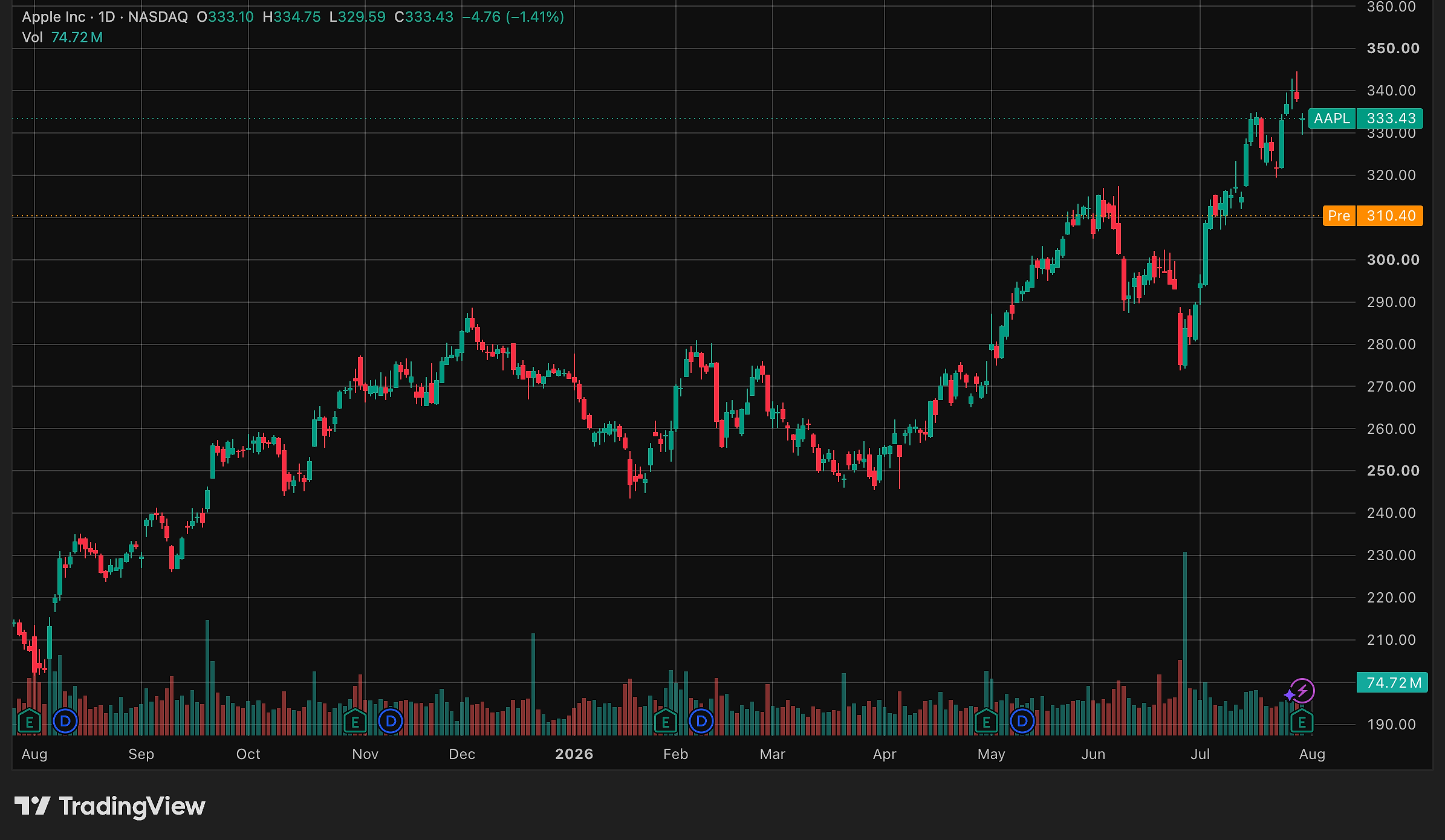
The free tier carries ads, and paying is the only way to remove them. Every paid tier does remove them, including the cheapest one, so an ad-free workspace costs no more than the entry price.
The other limits bite in specific situations, not constantly. Three price alerts run out fast if you want an entry level on every holding. Two indicators per chart is tight when a setup needs a moving average, volume, and a momentum reading at once. One saved layout means rebuilding a view instead of switching to it.
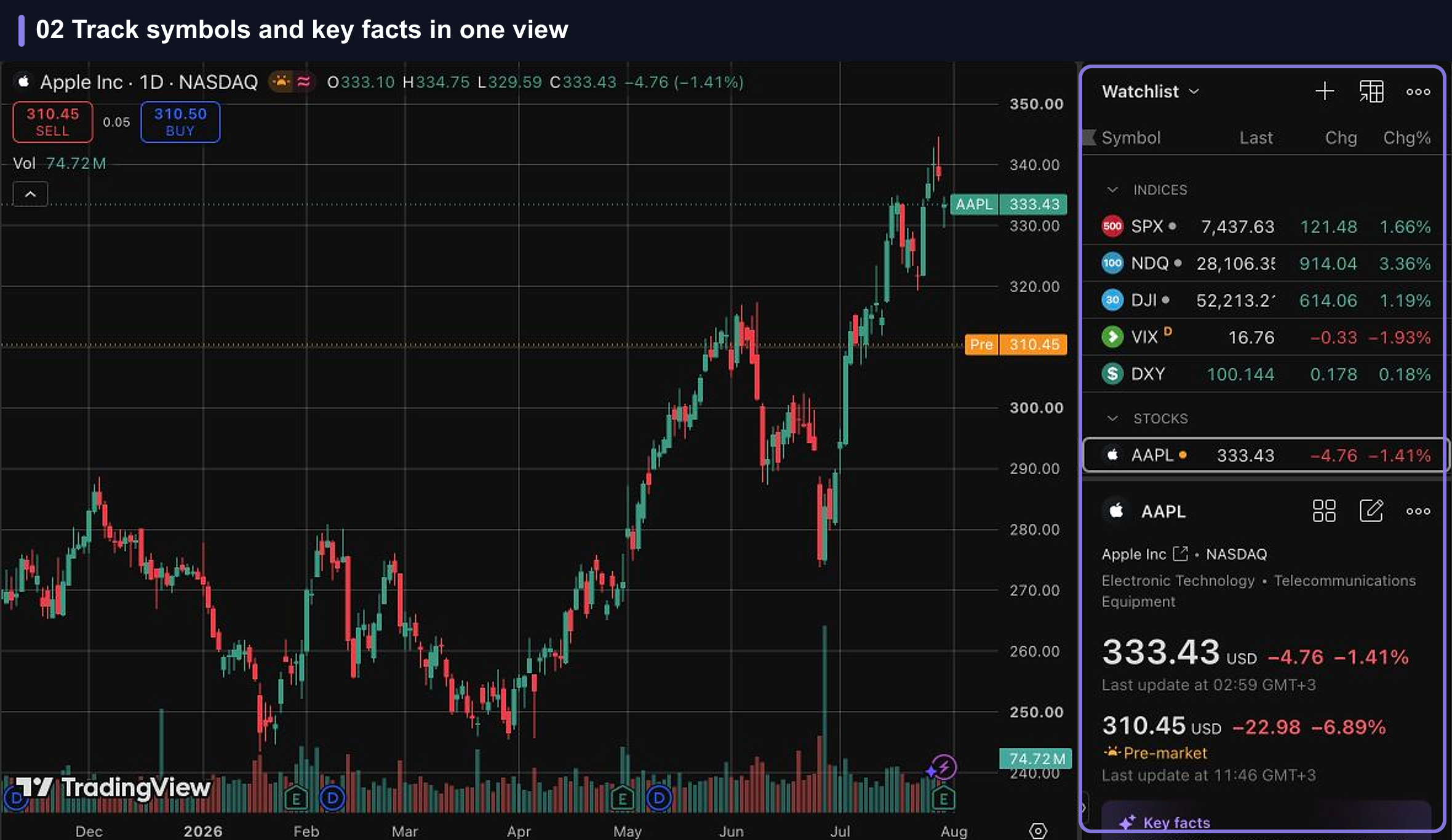
Three alerts is the tightest of those limits in practice. Follow ten positions, want a level on each, and you are already past it. None of that turns the free plan into a trial, though. It is a working tool with a ceiling, and whether you ever reach that ceiling depends entirely on how you use a chart.
What paying unlocks
The paid ladder is mostly a question of scale. Each step buys more charts in a single tab, more indicators on each chart, and a much larger allowance of alerts. All limits below come from TradingView's official pricing page.
- Essential: 2 charts per tab, 5 indicators per chart, 20 price alerts, 20 technical alerts, 0 watchlist alerts, and no ads.
- Plus: 4 charts per tab, 10 indicators per chart, 100 price alerts, 100 technical alerts, 0 watchlist alerts, and multi-condition alerts.
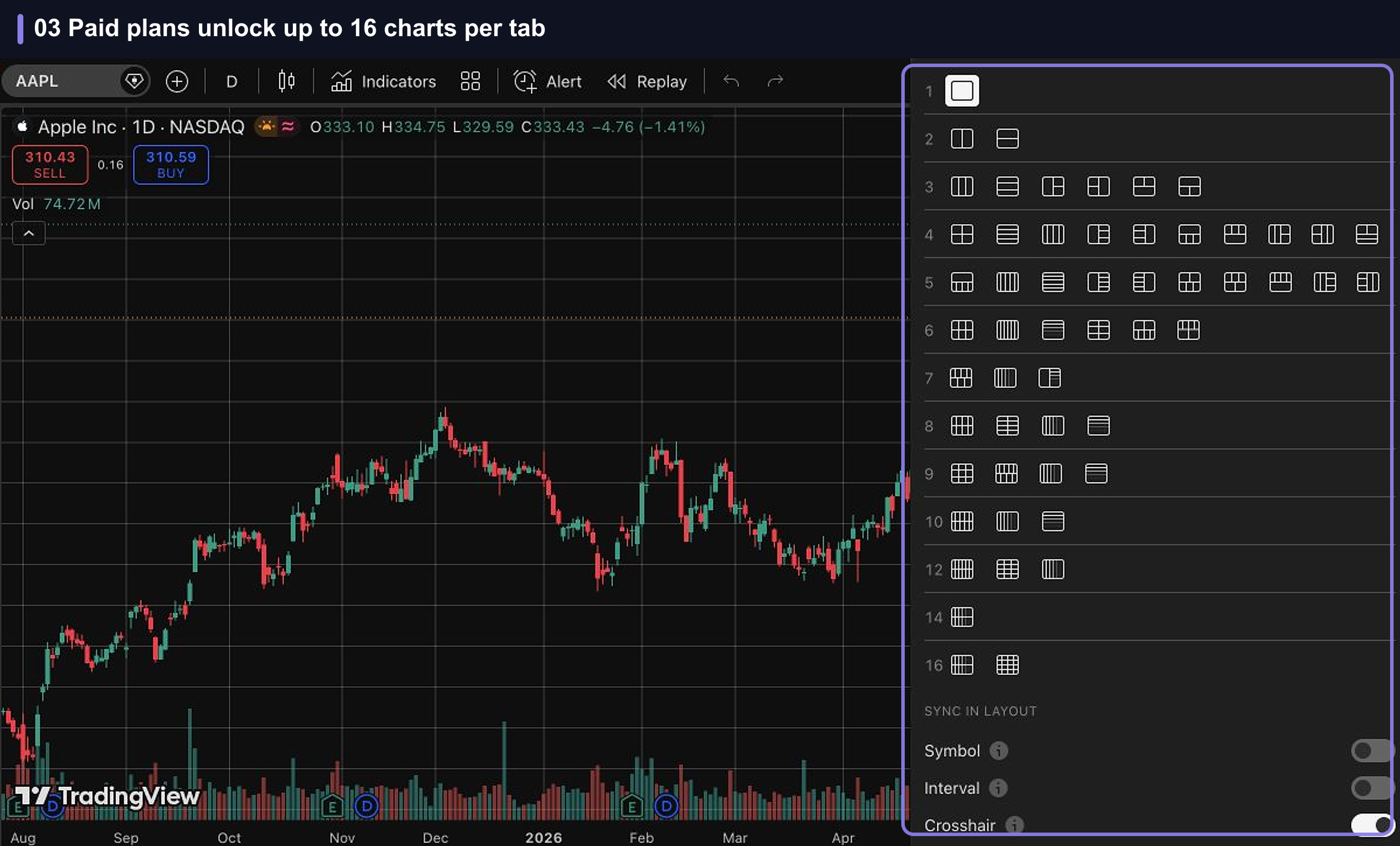
- Premium: 8 charts per tab, 25 indicators per chart, 400 price alerts, 400 technical alerts, and 2 watchlist alerts.
- Ultimate: 16 charts per tab, 50 indicators per chart, 1,000 price alerts, 1,000 technical alerts, and 15 watchlist alerts. Ultimate is also the only plan available to professional users.
Read that ladder and the first step does most of the work. Essential doubles the charts per tab, takes indicators from 2 to 5, takes price alerts from 3 to 20, and adds technical alerts on indicators, strategies, and drawings. One point is easy to get wrong: watchlist alerts are not part of the deal until Premium. Essential and Plus include none, Premium includes 2, and Ultimate includes 15. If watching a whole list instead of individual symbols is the reason you are upgrading, the entry tiers will not do it.
Above Essential, the tiers are built for people running several instruments side by side or holding large sets of standing alerts. Multi-condition alerts at Plus are the one upgrade that changes what you can express rather than how much of it you can hold, since an alert that fires only when two things are true at once starts at that tier. Everything else is a bigger allowance of what you already had.
When an upgrade is actually worth it
Upgrade when a named limit is slowing you down, not because a bigger number looks better on a pricing page. These are the triggers worth acting on:
- You need more than three standing price alerts, which happens as soon as you want an entry level on every holding.
- You need more than two indicators on one chart to read a setup properly.
- You want two or more charts side by side in a single tab instead of switching between them.
- You want an alert that fires only when several conditions are true together, which means Plus or higher.
- You want alerts across a whole watchlist instead of symbol by symbol, which means Premium or higher.
- The ads are getting in the way of how you use the workspace.
- You keep running out of chart history. Basic loads around 5,000 historical bars against 10,000 on Essential, which shows up quickly on intraday timeframes.
If none of those describes your week, the free plan is doing its job and a subscription buys you headroom you will not use. If one of them describes your week, start at Essential and move up only when a second specific limit blocks something you do regularly.
Alerts and day-to-day workflow
Alerts are the strongest argument for paying. A chart is something you open once you have already decided to look. An alert works while you are not looking, which is the more useful behavior for anyone holding a job alongside a portfolio.
The alert builder covers the condition you want to watch, how often it may trigger, when it expires, and how you want to be notified, with additional conditions available where your plan supports them.
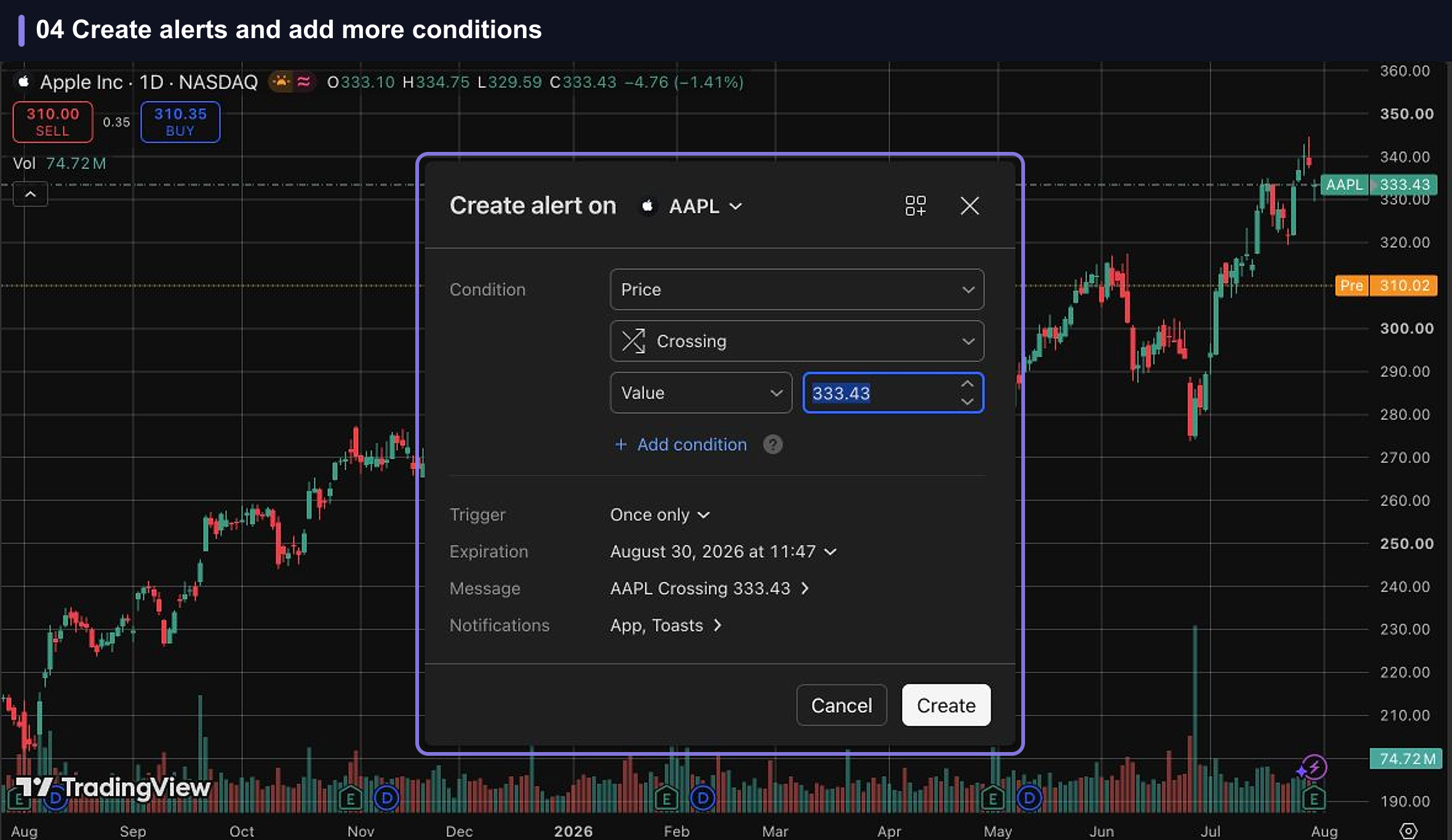
Twenty alerts on Essential covers a normal long-term portfolio with room left over. The hundreds available on Plus and above are aimed at systematic setups running across many instruments at once, not at someone tracking a dozen holdings. That is the pattern across the whole ladder: the cheap tier solves the everyday problem, and the expensive tiers solve a problem we would not expect most readers of this review to have.
Research tools beyond the chart
Charting is the headline, but a good share of the platform's day-to-day value sits in the research tools around it. The stock screener, the earnings calendar, and the economic calendar all come with the platform instead of as separate purchases, and they are the reason the free tier holds up better than a pure charting tool would.
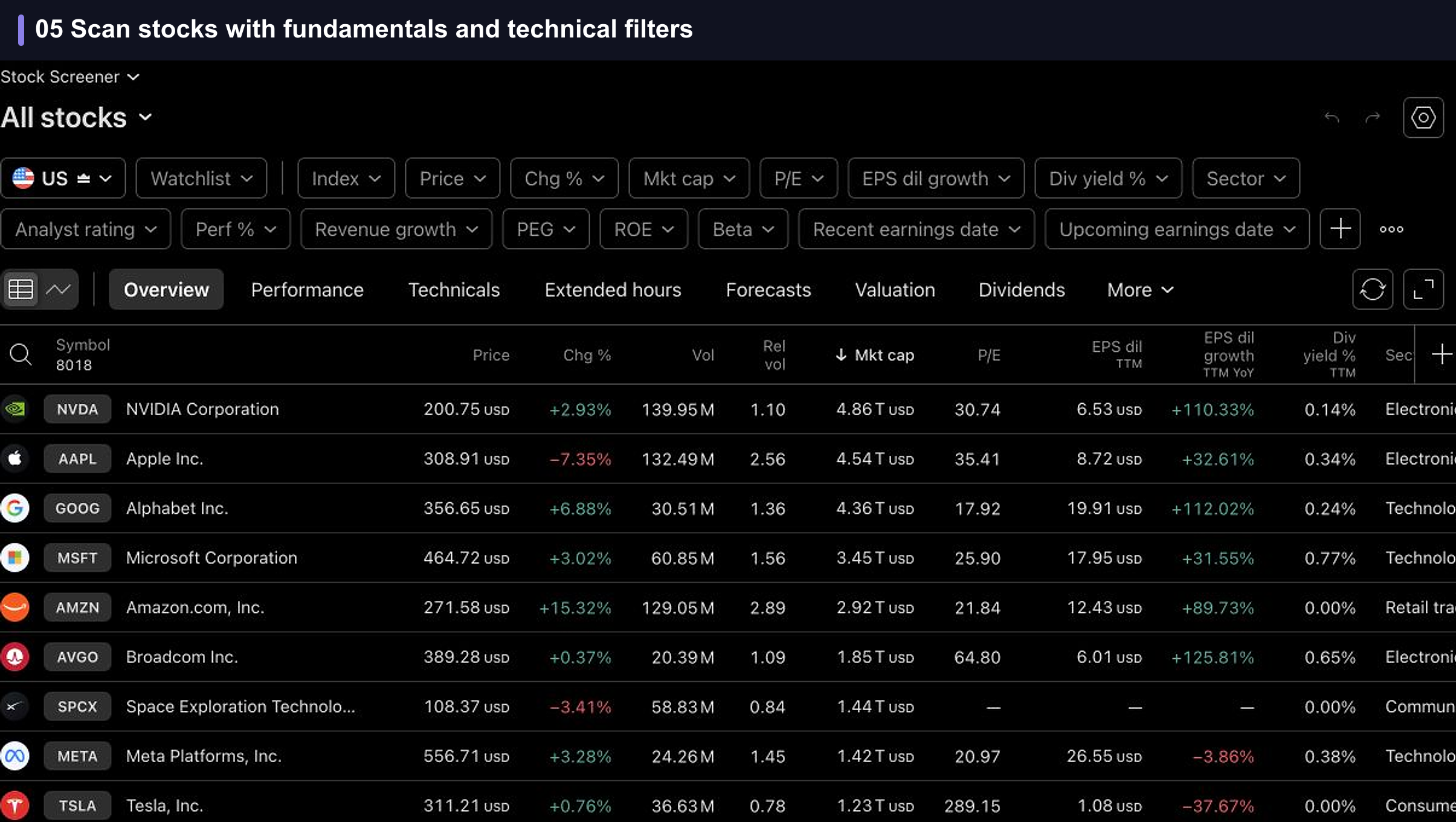
The screener pulls market data, valuation metrics, growth rates, analyst ratings, and upcoming earnings dates into one table, so a first pass over a sector does not need a second subscription. It will not replace a dedicated research service for anyone building a thesis from financial statements, but it answers the shortlist question well.
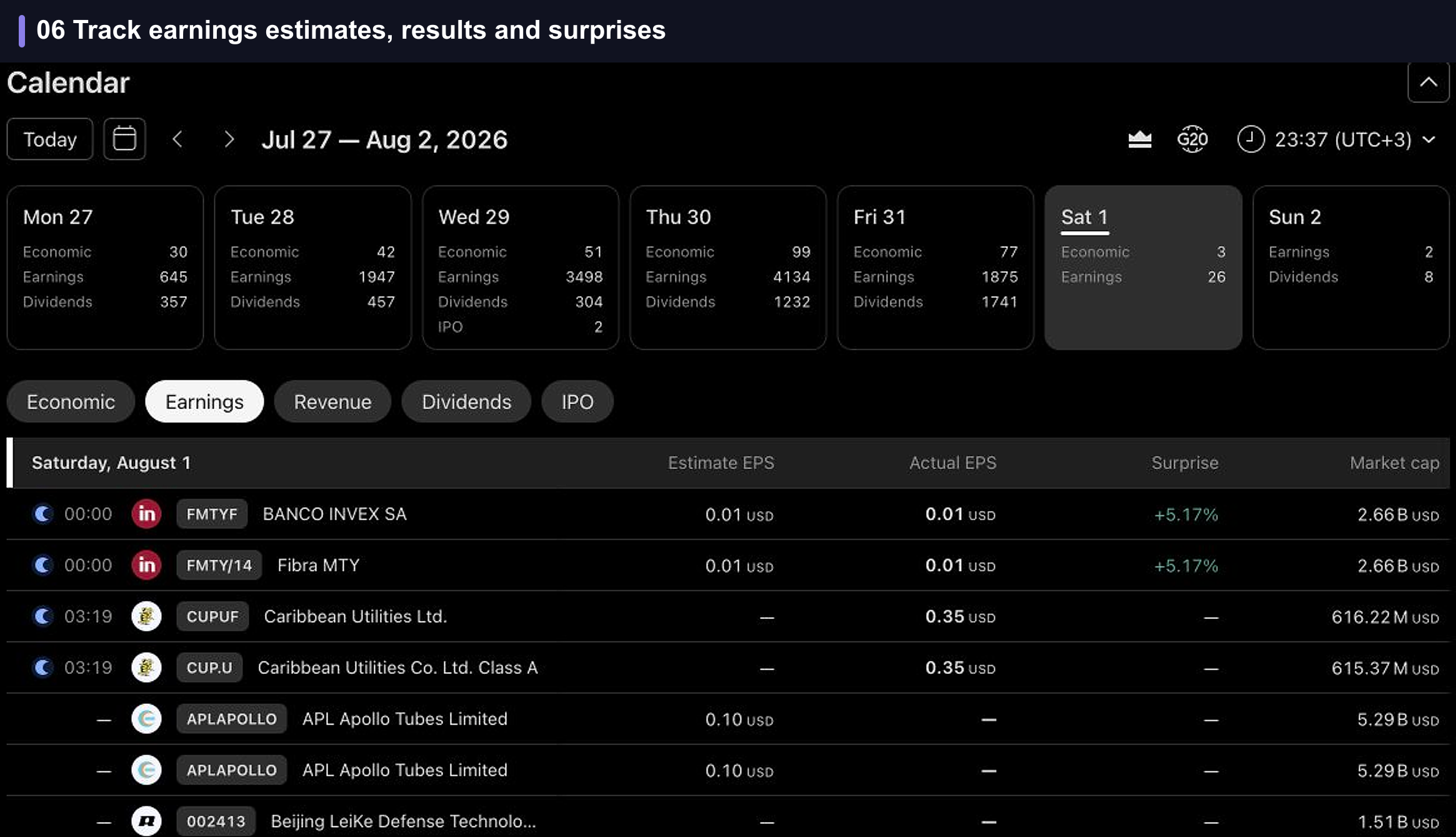
The earnings calendar covers the same ground for timing. Upcoming reports sit alongside estimates, actual results, and surprises, which is enough to know what is coming for the names you hold. Neither tool is a reason to pay for TradingView, and both are reasons the free plan stretches further than its headline limits suggest.
Pricing and value
The prices below are the United States rates from TradingView's official pricing page, shown as the effective monthly rate on annual billing and the yearly total.
- Essential: $12.95 per month, $155.40 per year, with a 30-day trial.
- Plus: $29.95 per month, $359.40 per year, with a 30-day trial.
- Premium: $59.95 per month, $719.40 per year, with a 30-day trial.
- Ultimate: $199.95 per month, $2,399.40 per year, with a 14-day trial.
Monthly billing, if you would rather not commit to a year:
- Essential: $14.95 per month.
- Plus: $34.95 per month.
- Premium: $69.95 per month.
- Ultimate: $239.95 per month.
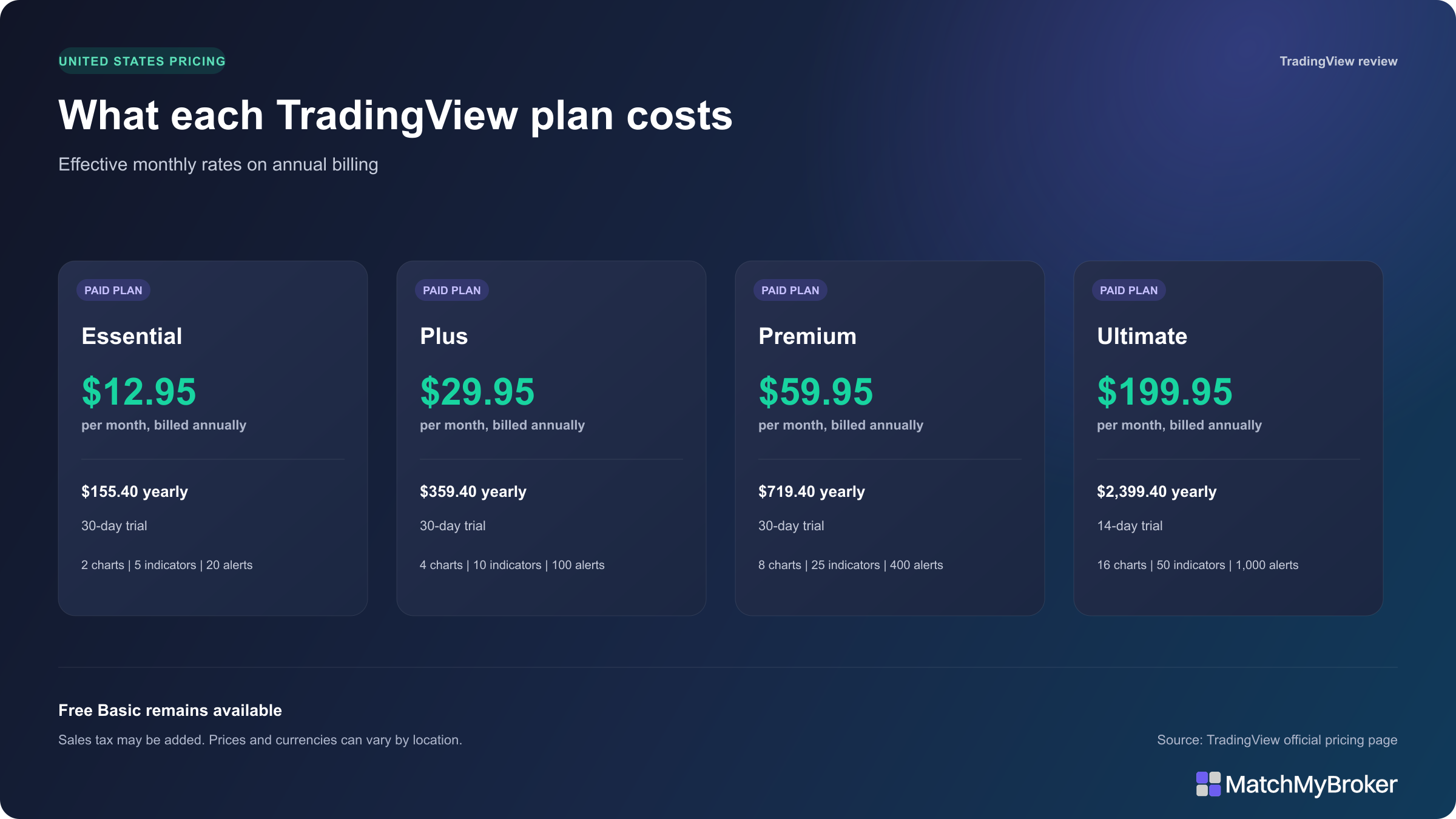
One detail to check if you are outside the United States: TradingView localizes the billing currency, and it may show the same plan number against a different currency symbol rather than a converted dollar amount. Check the billing currency and any sales tax on the checkout screen before you confirm, because the figure you end up paying is not always the figure you read here.
Essential at $155.40 per year is the only tier we would put in front of a typical retail investor, and only once the free limits cause real friction. Plus at $359.40 earns its price if you need multi-condition alerts or four charts in one view. Premium at $719.40 suits people whose standing alerts run into the hundreds and who want them across whole watchlists. Ultimate at $2,399.40 is a professional expense, and it is the only tier professional users can buy.
Price in one more thing before you subscribe: plans renew automatically unless you switch renewal off, so the cost repeats by default and stopping it takes a deliberate step.
Broker connections and market data
Connecting a broker lets you place trades from the chart instead of switching windows. TradingView's current directory includes brokers such as Interactive Brokers, TradeStation, OANDA, Pepperstone, and FOREX.com. Which instruments you can trade through the connection, and whether the broker is available to you at all, varies by broker and by region, so check the live directory against your own account rather than assuming a name on the list means a working connection for you.
Market data is the cost that is easiest to overlook. A paid TradingView plan does not automatically include real-time data for every exchange. The subscription buys platform features, meaning charts, indicators, alerts, and layouts. Exchange data sits outside that, and you cover it separately.
There are two normal routes to real-time prices. If you already have data through your broker, connecting that broker can carry the entitlement across, which TradingView documents in its guidance on broker-purchased data. Otherwise you buy a market-data subscription for the exchanges you need, on top of the plan price. Work that into your budget before comparing a paid plan against the charts already included with your brokerage account.
Keep charts in proportion while you are at it. Price action is one input into a decision, never the decision itself. Our guide on how to research a stock sets out where technical levels sit alongside the rest of the work.
Pros and cons
Here is the whole review compressed into its trade-offs. Read the cons closely, because the strengths are the easy part and the weaknesses are what decide whether you should pay.
How we scored TradingView 4.7 out of 5
The score reflects seven things: charting depth, how much genuine work the free plan supports, the research tools that come with the platform, alerts and day-to-day workflow, broker connectivity, price against what you get, and how accessible the whole package is to someone investing around a day job. TradingView scores highest on charting and on free-plan usefulness, where a free tier that stays a working tool is rarer than it should be.
The points come off for three things. Ads run on the free plan and paying is the only way out of them. Real-time exchange data sits outside the subscription price, which makes the headline cost incomplete for anyone who needs it. And the upper tiers are priced for professional workflows, which puts most of the ladder out of reach of the audience this review is written for.
Every plan limit, price, and offer rule in this review was checked against TradingView's official pricing, partner, and broker pages on 2 August 2026. Where TradingView's own documentation does not settle a detail, we say so rather than fill the gap.
Two outside signals are worth putting on the record, with their limits attached. The US App Store listing for TradingView: Track All Markets shows 4.8 out of 5 from roughly 399,000 ratings, which is a strong score at a scale that is hard to manufacture, though it measures the mobile app and not the paid web subscription this review is mostly about. The company's Trustpilot profile runs the other way: Trustpilot has withdrawn the company rating after a breach of its guidelines and says it removed a number of fake reviews, so there is no score there worth quoting and what remains is not a representative sample. Neither source settles how the paid web product performs over time, so the score above rests on TradingView's published terms and our own use of the free plan.
Our broader approach to reviews and how we assess a product is set out in about us.
Who should use TradingView and who can skip it
Occasional investors. Use the free plan. If you buy on a schedule, hold for years, and check a chart to sanity-check an entry, one chart and three alerts will not hold you back. Your broker's built-in tools plus the free Basic plan cover it.
Active technical traders. This is who the paid tiers exist for. If you watch several instruments at once, run more than a couple of indicators per chart, or maintain standing alerts across a watchlist, Essential or Plus pays for itself in saved time. Start at Essential and move up only when a specific limit blocks something you do regularly.
Fundamentals-first investors. TradingView sits at the edge of your process, never at the center of it. If your work is reading financials and comparing valuations or building a thesis, a charting platform will always be the supporting act. Compare specialist research platforms in our guide to the best stock analysis tools before paying for chart features you will not use.
Frequently asked questions
Is TradingView free?
Yes. The free Basic plan includes one chart per tab, two indicators per chart, one saved layout, one watchlist of up to 30 symbols, one portfolio of up to 20 holdings, and three price alerts. The free plan shows ads. Paid plans start at $12.95 per month on annual billing.
Is TradingView a broker?
No. TradingView is a charting and analysis platform. You can connect a supported broker and place trades through the interface, or use paper trading instead, but the account, the custody of your money, and the execution all sit with the broker.
Does TradingView include real-time market data?
Not automatically for every exchange. A paid plan covers platform features, not universal data entitlements. Real-time data for a given exchange may require an entitlement through your connected broker or a separate market-data subscription.
Which TradingView plan is best for most people?
For most retail investors, the free Basic plan. If its limits start getting in the way, Essential at $12.95 per month on annual billing is the sensible next step, with 2 charts per tab, 5 indicators per chart, 20 price alerts, 20 technical alerts, and no ads. Note that Essential and Plus include no watchlist alerts, so go to Premium only if alerts across a whole list are what you need.
Can I cancel TradingView before renewal?
Yes. Subscriptions renew automatically unless you turn renewal off. If you subscribed on the web, open Settings and billing, then Subscriptions, and switch off automatic renewal. TradingView recommends doing this at least 24 hours before the next billing date. Your access continues until the period you have already paid for ends.
How does the $15 TradingView discount work?
New users who buy a qualifying TradingView subscription through our partner link receive a $15 discount coupon toward that new plan. The purchase must be made on the web. Existing users, app purchases, market-data purchases, add-ons, and purchases made using TradingView Rewards do not qualify. TradingView sets the terms and administers the offer.
Final verdict
Stay on the free plan until it stops working for you. One chart, two indicators, and three alerts read as restrictive on paper, and they match how an occasional investor actually uses a charting tool. When one of the upgrade triggers above starts costing you time, Essential at $12.95 per month on annual billing is the step to take, and the tiers above it earn their price only for a much larger technical workflow. Check what real-time data you need, and what it costs, before you subscribe. TradingView scores 4.7 out of 5.
If what you need is a brokerage account instead of a charting tool, start with BrokerMatch and come back to this decision once the account is open.
Kai is an investor who helps people choose the right broker and invest with confidence. He founded MatchMyBroker, a broker-comparison site for a global audience, and EU Investing Hub, his European-focused investing site. He also runs the Smart Money with Kai YouTube channel, where he breaks down investing, brokers and personal finance.